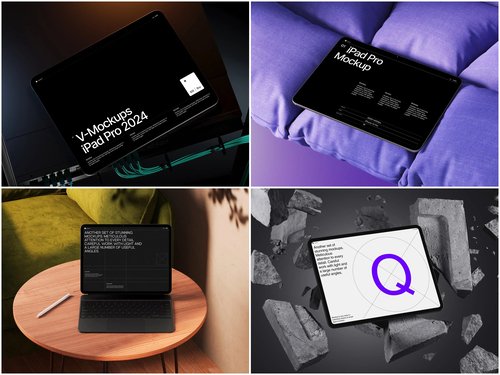
You’ve seen the classic mockup move: slap a screenshot on a device frame, post it on a landing page, call it a day. But marketers who actually think are doing something far more interesting with iPad mockups — and honestly, most people haven’t caught on yet.
Let’s fix that.
1. Pitch Decks That Don’t Put Investors to Sleep
Forget bullet-point slides drowning in Comic Sans energy. Drop your app UI or dashboard into an iPad mockup and embed it mid-presentation. Investors visualize the product in their hands before you’ve even said “Series A.”
2. Email Campaigns With Scroll-Stopping Hero Images
Most promotional emails look identical. A beautifully rendered iPad showing your newest feature or seasonal offer creates an immediate visual anchor. Open rates don’t lie — imagery that feels premium gets clicks.
3. Recruiting Top Design Talent
Posting a job ad? Show your actual product in a sleek device mockup. Top-tier designers and developers silently judge company culture by aesthetics. A polished visual says: we care about craft here.
4. Internal Stakeholder Buy-In
Getting sign-off from non-technical stakeholders is painful. Showing a flat wireframe to a CFO is asking for confusion. Wrap that same wireframe in a realistic iPad scene — suddenly everyone “gets it,” feedback becomes useful, and approvals come faster.
5. Educational Course Thumbnails
Online educators selling courses on Teachable, Udemy, or Gumroad consistently underestimate thumbnail design. A crisp iPad displaying your course material communicates professionalism before a single word is read.
Mockups as Social Proof Boosters
Social proof is only as powerful as its presentation. A wall of text testimonials is forgettable. But when you pair a client quote with a visual reconstruction of their actual results — displayed inside a polished iPad scene — something psychological shifts. It stops feeling like marketing and starts feeling like evidence.
When a client says “our productivity jumped 40%,” don’t just quote them. Recreate their dashboard inside an iPad mockup and place it right beside that testimonial. Now the claim has texture. It has weight.
Social proof was always about borrowed credibility. Mockups make that credibility visible.
6. App Store Optimization (ASO) Screenshots
Your App Store screenshots are arguably your highest-ROI marketing real estate. Most developers treat them as an afterthought. Strategic iPad mockup scenes — showing real use cases, not just UI — can dramatically lift conversion from page visit to download.
7. Seasonal Campaign Swaps
Same product, different contexts. Place your app in a cozy winter flat-lay for December, then a sunlit café scene for summer. The product doesn’t change — the feeling does. This is mood-driven marketing, and it works.
8. Print and Out-of-Home Advertising
Digital mockups aren’t just for screens. High-resolution iPad mockup renders translate beautifully to print: magazine spreads, trade show banners, brochures. The three-dimensional quality adds tactile credibility that flat screenshots never achieve.
Real-World Examples of iPad Mockups in Practice
These aren’t hypothetical — this is how actual brands are using mockups right now:
- Notion uses device mockups heavily across their template marketplace, helping users visualize the end result before purchasing or downloading a template.
- Figma showcases community-made UI kits using iPad frames to communicate scale, layout, and real-world usability — instantly elevating perceived value.
- SaaS onboarding sequences from tools like Monday.com drop product screenshots into device mockups inside welcome emails, reducing churn by helping new users quickly understand the interface.
- Freelance designers on Dribbble use iPad mockup scenes as portfolio covers — dramatically increasing profile views compared to bare artboards.
The pattern? Context creates desire. When people see a product situated in life, they want it more.
9. LinkedIn Thought Leadership Posts
Carousels on LinkedIn are booming. A thought leadership carousel where each slide shows a different screen inside a rotating iPad angle? That’s content people save, share, and remember.
10. Onboarding Emails That Actually Teach
Instead of describing a feature in text, show it. A single iPad mockup screenshot inside an onboarding email, highlighting exactly where to click, reduces support tickets and increases feature adoption simultaneously.
iPad Mockups on ls.graphics
If you’re serious about mockup quality, ls.graphics delivers on every front. Their iPad collection features ultra-realistic rendering with meticulously organized layers, making customization genuinely painless. You get multiple angles, various color styles, and stylish minimalist compositions that feel editorial rather than generic. The Edit Online feature means you can swap in your design directly in the browser — no Photoshop required. Best of all, there’s a generous selection of free scenes to explore before committing, so you can test quality firsthand without spending a cent.
Conclusion
iPad mockups are wildly underused as a strategic marketing asset. From investor pitches to ASO screenshots, from LinkedIn carousels to print campaigns — the creative applications go far beyond “put app on screen, ship it.”
Start thinking of mockups as context machines. They don’t just display your product; they place it inside a world your audience already wants to live in.
Resources like ls.graphics make it easier than ever to execute this at a premium level — with zero excuses for settling for mediocre visuals.
Your competitors probably haven’t figured this out yet. Use that.